
Topaz AI
Topaz Labs / topazlabs.com
AI image and video enhancement software that upscales, denoises, sharpens, and restores photos and video using specialised neural networks.
Pricing
$199/mo
Free plan
No
Category
Image Generation
Platforms
2
Free plan
No
API access
No
Open source
No
Platforms
2
What is Topaz AI?
Topaz Labs is a software company focused entirely on AI-powered image and video enhancement, differentiating from generative AI tools through specialisation in restoration and quality improvement rather than creation. Topaz AI tools are used by professional photographers, videographers, and filmmakers to improve existing image and video quality in ways that were previously only achievable through expensive manual retouching.
Gigapixel AI is the flagship image upscaling product. It uses neural networks trained specifically to upscale images while generating realistic detail rather than simply enlarging pixels. A photograph upscaled 4x with Gigapixel AI produces believably detailed output where standard algorithms produce blurry results. Professional photographers use it to deliver large-format prints from files that would normally be too small, and archivists use it to improve digitised historical photographs.
Topaz Video AI applies similar enhancement technology to video, with upscaling, denoising, motion interpolation (adding frames for smoother playback), and interlacing correction. The ability to upscale standard definition archival footage to modern resolutions has made it popular in broadcast and archival contexts.
Photo AI combines Topaz's various image enhancement tools into a single product that can automatically detect the improvements a photo needs and apply them. Noise reduction, sharpening, face restoration, and upscaling are applied based on what the AI detects in the image.
The pricing model is one-time payment or annual subscription, which is unusual in a market dominated by monthly subscriptions. The one-time pricing is popular with professional users who prefer predictable software costs without ongoing fees.
Topaz tools are desktop software rather than web-based, which means they process images locally without uploading to cloud servers. This is a privacy advantage for photographers who do not want client images leaving their equipment.
How Topaz AI works
Topaz AI runs as image enhancement model software built around image and video workflows. Users typically start with a prompt, upload, or connected data source, and the underlying model handles the heavy lifting before returning a result you can refine or export. It's available on windows and mac.
Watch Topaz AI in action
Recent YouTube videos cached from the backend so this page stays fast and fresh.


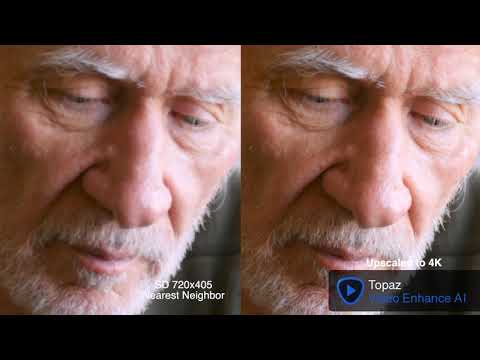
What makes it worth shortlisting
The capabilities that matter most for teams evaluating Topaz AI.
Gigapixel AI upscaling
Upscales images up to 6x while generating realistic detail using neural networks trained specifically on upscaling tasks.
AI denoising
Removes noise from low-light or high-ISO images while preserving detail and texture.
Motion interpolation
Adds synthetic frames to video for smoother playback or frame rate conversion.
Best use cases
Who should use it
Pros
- Best-in-class AI image and video upscaling quality
- One-time pricing option preferred by professionals
- Local desktop processing provides strong privacy
- Professional integrations with Lightroom, Photoshop, and Premiere Pro
Cons
- Desktop software with hardware requirements (modern GPU recommended)
- One-time purchase is expensive upfront
- Less useful for image creation tasks as this is enhancement only
- Requires significant processing time for batch operations
Is it worth the price?
Gigapixel AI: $199 one-time or $99/year. Video AI: $299 one-time or $149/year. Photo AI: $199 one-time or $99/year. Bundle pricing available.
Model
One-time
Starting price
$199/mo
Free trial
Yes
Tools like Topaz AI
Adobe Photoshop AI Super Resolution provides upscaling within Creative Cloud. Luminar Neo is an AI photo editor with enhancement features. DaVinci Resolve includes video enhancement tools for professional video editors.
Topaz AI vs Magnific AI
A side-by-side look at the closest alternative in this category.
Topaz AI
Topaz Labs
Magnific AI
Magnific AI
Gigapixel AI: $199 one-time or $99/year. Video AI: $299 one-time or $149/year. Photo AI: $199 one-time or $99/year. Bundle pricing available.
No free plan. Pro $39/month (50 upscales). Business $99/month (250 upscales). Enterprise custom. 7-day free trial.
Local desktop processing keeps images on your hardware. No cloud upload required. Review licence terms for commercial use.
Review Magnific AI data handling policy. Uploaded images processed on Magnific servers.
Images are processed locally on your desktop hardware. No cloud upload required, providing strong privacy for client and sensitive images.
Review Magnific AI privacy policy before uploading client or proprietary images.
- Best-in-class AI image and video upscaling quality
- One-time pricing option preferred by professionals
- Local desktop processing provides strong privacy
- Professional integrations with Lightroom, Photoshop, and Premiere Pro
- Generates believable detail during upscaling unlike blurry traditional methods
- Creativity slider provides control over detail generation vs faithfulness
- Professional-grade output used in commercial photography and print
- Popular among professional photographers for commercial production work
- Desktop software with hardware requirements (modern GPU recommended)
- One-time purchase is expensive upfront
- Less useful for image creation tasks as this is enhancement only
- Requires significant processing time for batch operations
- No free plan — significant upscale credits start at $39/month
- 7-day trial is short for thorough professional evaluation
- $39/month is expensive for occasional upscaling needs
Technical & deployment info
Key facts about model providers, platforms, and team support.
Model Provider
Topaz Labs
Models
Gigapixel AI, Video AI, Photo AI
Platforms
Windows, Mac
Deployment
Desktop
Integrations
Lightroom, Photoshop (plugin), Premiere Pro (plugin)
Team Collaboration
No
Launch Year
2015
Security & privacy
Compliance signals and data-handling notes as reported by the vendor.
Local desktop processing keeps images on your hardware. No cloud upload required. Review licence terms for commercial use.
Images are processed locally on your desktop hardware. No cloud upload required, providing strong privacy for client and sensitive images.
What users are saying
Verified reviews from signed-in users, stored in the backend and averaged into this tool's rating.
Sign in to rate Topaz AI and leave a review.
No other reviews yet — be the first to share how this tool performs in practice.
Common questions about Topaz AI
Editorial Verdict
Should you use Topaz AI?
Topaz AI tools are the best choice for photographers and videographers who need to improve the quality of existing images and video. They are not relevant for image generation or creative AI use cases.
Last verified July 24, 2026.